Show HN: Kurvengefahr – browser CAD/CAM for pen plotters
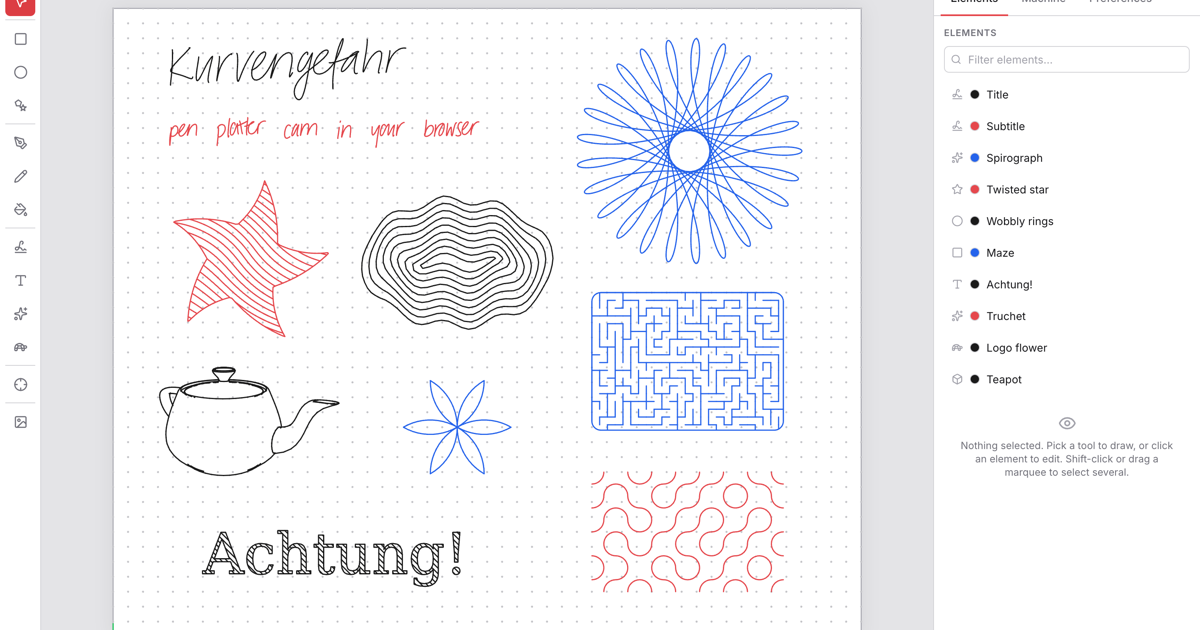
The short version
- I recently wanted to dabble in line art again and made a small browser app to make it easier.
- If you own an AxiDraw or a GRBL plotter, I'd very much appreciate it you gave it a try and give feedback.
- As I don't own those, I did all the testing with a hardware mock on STM32, so I am not sure how well it works attached to an actual plotter.
- Source code and docs are on GitHub: https://github.com/tibordp/kurvengefahr Comments URL: https://news.ycombinator.com/item?id=48881352 Points: 6 # Comments: 1
The story
A few years ago I made a pen plotter attachment for Prusa MK4 (https://www.printables.com/model/827264-pen-plotter-attachme...) and at the time I didn't have a good way to turn artwork into G-code for it, and I put the project on ice for a while.
I recently wanted to dabble in line art again and made a small browser app to make it easier. As agentic AI tools of 2026 are quite addictive, it rather quickly grew into something quite a bit more - an integrated browser CAD/CAM for pen plotters that covers everything from importing existing artwork, creating artwork from scratch, preparing for plotting and hardware integration. It includes some off-beat features like a Logo interpreter for turtle art and Graves RNN for handwriting synthesis and in addition to 3D printer pretending to be pen plotters it now also supports actual pen plotters based on EBB (AxiDraw) and GRBL firmwares through Web Serial.
If you own an AxiDraw or a GRBL plotter, I'd very much appreciate it you gave it a try and give feedback. As I don't own those, I did all the testing with a hardware mock on STM32, so I am not sure how well it works attached to an actual plotter.
Source code and docs are on GitHub: https://github.com/tibordp/kurvengefahr
Comments URL: https://news.ycombinator.com/item?id=48881352
Points: 6
# Comments: 1
Powered by Gab AI
The Story At A Glance
Reading this article now — analysis appears below
💡 AI analysis provides alternative perspectives on current events



